Coming to iPhone
Your AI coding limits, always on your Home Screen.
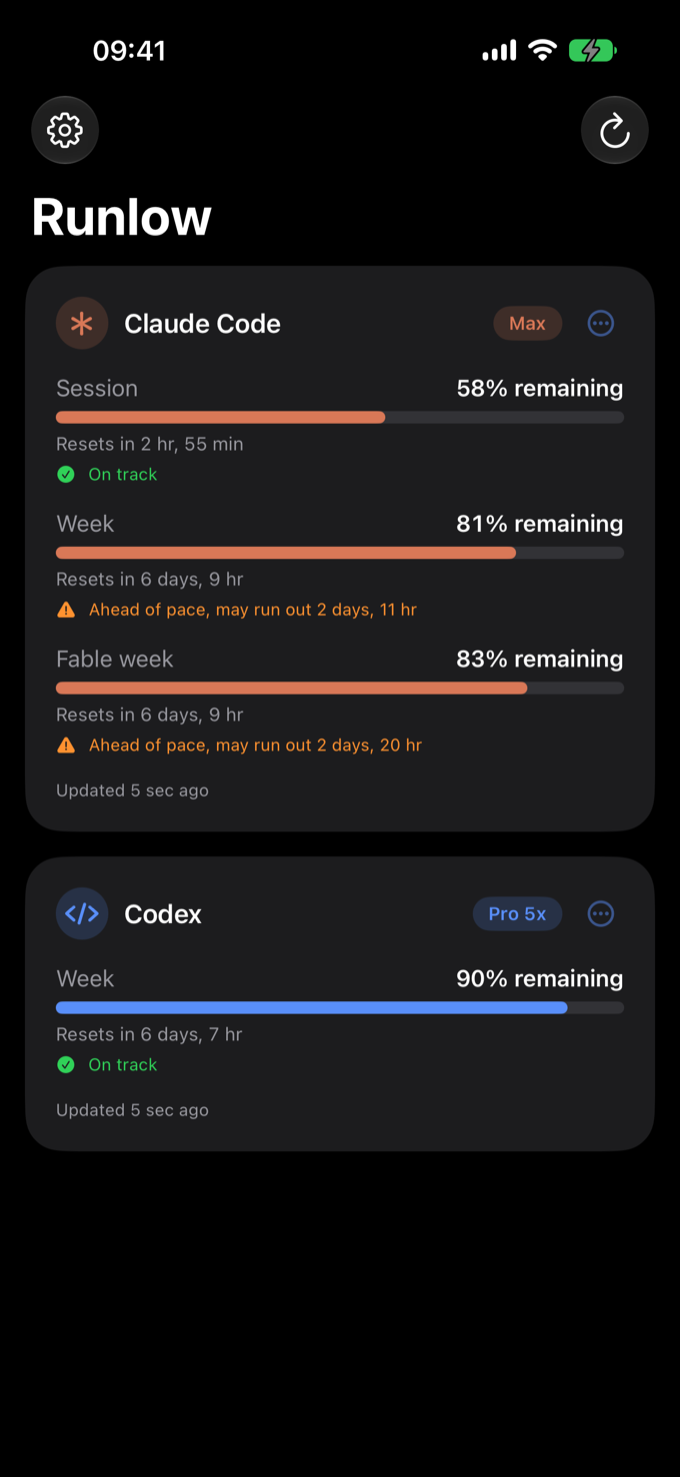
Runlow watches your session and weekly windows for Claude Code and Codex, then puts what’s left right on your iPhone: percent remaining, reset countdowns, refreshed in the background. No Runlow server, no tracking.
100% on-device No tracking Free, no account
01 · How it works
Three steps, then it just runs.
No account to create, no setup ceremony. Connect once and the numbers follow you.
Connect with the provider’s own sign-in
Tap Connect and sign in on the provider’s own page, on your device. Runlow never sees or stores your password.
Your tokens stay in the Keychain
The access tokens live in the iOS Keychain, encrypted by the system. They’re only ever sent to the provider that issued them, never to a Runlow server.
Widgets update in the background
The app fetches your usage straight from each provider and caches a snapshot locally. Your widgets read it, even while the app is closed.
02 · Features
Small app, sharp instrument.
Everything Runlow does, and nothing it doesn’t.
Home Screen widgets
Small and medium sizes per provider, pinned where you already look. Free.
Session & weekly windows
Both windows tracked per provider, shown as percent left or used, with a live countdown to every reset.
On-device OAuth
Sign-in happens in each provider’s own flow, on your iPhone. No middleman, no proxy, no Runlow server.
Background refresh
iOS wakes the app to refresh quietly, so the numbers are already fresh when you glance at them.
Five languages
English, French, German, Spanish and Italian, widgets included.
Both providers at oncePro
Free tracks one provider. Pro connects Claude Code and Codex side by side, including a combined widget.
Lock Screen widgetsPro
Circular and rectangular widgets on your Lock Screen, so your limits are one glance away without unlocking.
Pace hints & run-out alertsPro
See whether you’re burning a window faster than the clock, and get a heads-up before you run out. Reset alerts stay free.
Light or dark, your call
Widgets follow your iPhone’s appearance, or stay pinned to dark only or light only.
03 · Plans
Free to use. Pro when you want more.
One provider is free forever. A single purchase unlocks the rest, and the first seven days are on the house.
Everything you need to watch one tool.
- One provider (Claude Code or Codex)
- Home Screen widgets
- Session & weekly windows with reset countdowns
- “Limits are back” alerts
- English, French, German, Spanish & Italian
A single purchase, no subscription. 7-day free trial first.
- Everything in Free, plus
- Both providers at once
- Lock Screen widgets (circular & rectangular)
- Pace hints: your usage against the clock
- Run-out alerts before a window empties
Try everything free for seven days. Pro is a one-time purchase, never a subscription.
04 · Privacy
Runs low on data collection, never on features.
The honest version is short: Runlow has no servers, so your data has nowhere to go.
Sign-in happens on your device through each provider’s own OAuth flow. Everything the app keeps, it keeps on your iPhone.
On-device snapshots
Usage numbers are cached in a local App Group container so the widgets can read them. That cache stays on your iPhone and disappears when you delete the app.
Direct provider traffic only
The only network requests go from your device straight to the providers you connect. There is no Runlow backend, no relay, no third-party API in between.
No tracking, no ads, no analytics
No analytics SDK, no crash reporter phoning home, no ads, no fingerprinting. The app could not tell anyone you use it even if it wanted to.
Free, Pro is a one-time buy
Connect one provider free. An optional one-time Pro purchase adds the second, plus pace hints, run-out alerts and Lock Screen widgets. Paid through the App Store, no subscription, no ads, and it never collects data about you.
Independent, not affiliated
Runlow is an independent personal project. It is not affiliated with, endorsed by, or sponsored by Anthropic or OpenAI. The names Claude Code and Codex are used only to identify the services you choose to connect; trademarks belong to their owners.
Don’t take our word for it
You don’t have to trust a privacy promise. iOS keeps its own log of every domain each app talks to, and you can read it yourself in three minutes.
-
Turn on iOS App Privacy Report
Settings › Privacy & Security › App Privacy Report, then tap Turn On. -
Use Runlow for a bit
Connect a provider, let the widgets refresh, glance at your limits. Just normal use.
-
Read the report
It lists every domain the app contacted. The domains you’ll see all belong to the providers you connected. What you won’t find is any Runlow domain, because there is no Runlow server for your data to reach.
Same story everywhere it counts: no analytics SDK, no ad network, no crash reporter. When Runlow reaches the App Store, its privacy label will read Data Not Collected, because there is nothing to declare. Delete the app and the on-device cache goes with it.
05 · FAQ
Questions, answered plainly.
Is Runlow an official Anthropic or OpenAI app?
No. It is an independent personal project, not affiliated with, endorsed by, or sponsored by either company. The names Claude Code and Codex appear only to identify the services you can connect.
Where do my tokens live?
In the iOS Keychain on your device, encrypted by the system. They are only ever sent to the provider that issued them, and they never touch a Runlow server, because there isn’t one.
What network traffic does the app generate?
Only direct requests from your iPhone to the providers you connect: the sign-in flow, then periodic usage checks. Nothing else. No telemetry, no third parties.
Which providers are supported?
Claude Code (Anthropic) and Codex (OpenAI). Each one is optional: connect one, the other, or both.
Do I need a Runlow account?
No such thing exists. You sign in with each provider’s own account, through their own OAuth page, on your device.
How do the widgets refresh?
iOS periodically wakes the app in the background; it fetches fresh usage from the providers and writes a snapshot to a local shared container that the widgets read. Opening the app, or pulling to refresh, updates everything instantly.
Can I verify the privacy claims myself?
Yes. Turn on iOS App Privacy Report (Settings › Privacy & Security), use the app, then read the report: it lists every domain Runlow contacted. The domains belong to the providers you connected; you’ll never see a Runlow server, because there isn’t one.
What’s free, and how much is Pro?
One provider plus Home Screen widgets and reset alerts are free forever. Pro adds the second provider, Lock Screen widgets, pace hints and run-out alerts. It is a one-time purchase of $2.99 (2,99 €), not a subscription, with a seven-day free trial first.